
Complete Amazon orders guide for tracking packages, managing returns, and maximizing Prime benefits. Expert tips to streamline your shopping experience.

Managing your Amazon orders doesn't have to feel overwhelming. Whether you're tracking multiple packages, handling returns, or trying to maximize your Prime membership, understanding the order management system saves time and reduces stress. This Amazon orders guide walks you through everything from order status meanings to hidden features most shoppers never discover.
American consumers place over 66,000 orders on Amazon every hour. With such volume, knowing how to efficiently manage orders becomes essential. This guide provides practical tips, troubleshooting solutions, and expert strategies to streamline your entire shopping experience.
Understanding Your Amazon Order Status

Key Order Status Types
Amazon uses specific status indicators to show where your order stands in the fulfillment process. Understanding these terms helps you know exactly when to expect delivery. The pending status means Amazon received your order but hasn't started processing payment yet. This typically lasts just a few minutes.
Processing status indicates Amazon is preparing your items for shipment. During this phase, the warehouse team locates products, packages them securely, and prepares shipping labels. This stage usually takes several hours to one business day depending on the item and fulfillment center location.
Shipped status confirms your package left the Amazon facility and is en route to your delivery address. Once shipped, you receive tracking information to monitor real-time progress. Out for delivery means the package is on the local delivery vehicle and should arrive that same day.
Best Practices for Monitoring Status
- Check your order status through the Amazon app for fastest updates
- Enable push notifications to receive instant status changes
- Review estimated delivery dates rather than fixating on status labels
- Understand that status updates may lag behind actual package movement by several hours
Optimal Timing for Status Checks
Check order status once daily rather than multiple times hourly. Amazon updates tracking information in batches throughout the day. Excessive checking won't speed up delivery but may increase anxiety about order management.
For time-sensitive orders, check status in the evening after 6 PM local time when most daily updates complete. Morning checks often show outdated information from the previous night's data sync.
Tracking Your Packages Like a Pro

Advanced Tracking Features
Amazon order management includes sophisticated tracking tools most customers underutilize. The map view shows your package's real-time location when out for delivery. This feature works through the Amazon app and provides minute-by-minute updates as the delivery vehicle approaches your address.
Photo on delivery captures images of where drivers leave packages. This visual confirmation helps locate items quickly and provides proof of delivery. Enable this feature in your delivery preferences for all orders automatically.
Pro Tracking Strategies
Mobile App Advantages
The Amazon mobile app provides superior tracking capabilities compared to the website.
- Real-time push notifications for every status change
- GPS-based delivery maps showing driver proximity
- One-tap access to delivery photos and signatures
- Offline access to recent order details
Desktop Tracking Tools
Desktop order management offers comprehensive views for multiple orders simultaneously.
- Bulk tracking for orders across different accounts
- Detailed shipping carrier information and links
- Print-friendly tracking summaries for record keeping
- Advanced filtering by date, status, and product type
Email Tracking Updates
Configure email preferences to receive automatic tracking notifications.
- Shipment confirmation with tracking numbers
- Out for delivery morning alerts
- Delivery confirmation with package photos
- Delay notifications if issues arise
Third-Party Integration
Connect Amazon orders to universal package tracking services for centralized management.
- Combine Amazon tracking with other retailers
- Calendar integration for delivery scheduling
- Smart home notifications through Alexa devices
- Package consolidation tracking for multiple orders
Ideal Tracking Schedules
Set specific times to check tracking information rather than constantly monitoring. Review tracking once in the morning around 9 AM for overnight updates. Check again around 3 PM when most delivery routes begin. A final evening check around 7 PM confirms successful delivery or identifies any issues requiring attention.
Delivery Options & Speed Hacks

Essential Delivery Methods
Amazon offers multiple delivery speeds to match different urgency levels and budgets. Same-Day Delivery gets eligible items to your door within hours for a premium fee. This service works best for last-minute needs in major metropolitan areas where Amazon maintains local inventory.
One-Day Delivery provides next-business-day arrival for Prime members at no extra charge on millions of items. Two-Day shipping remains the standard Prime benefit, balancing speed with broad product selection. Standard shipping takes five to eight business days but costs nothing for orders over the minimum threshold.
Speed Optimization Techniques
- Order before 12 PM local time to qualify for same-day or next-day delivery cutoffs
- Choose "Amazon Day Delivery" to consolidate multiple orders into one weekly delivery
- Select alternative delivery locations like Amazon Lockers for faster processing
- Use "Buy with Prime" on third-party websites for consistent Prime delivery speeds
- Filter search results by Prime eligibility to see only fast-shipping products
Strategic Timing for Orders
Place orders on weekday mornings for fastest fulfillment. Amazon warehouses process weekday orders more quickly than weekend purchases. Tuesday through Thursday orders typically ship same-day, while Friday orders may not ship until Monday.
Avoid ordering during peak seasons like Prime Day or Black Friday unless necessary. During high-volume periods, even Prime shipping can experience delays. For critical deliveries, order at least three days earlier than your deadline during busy shopping seasons.
Affiliate Disclosure: This article contains affiliate links to products on Amazon. We may earn a small commission when you purchase through these links at no additional cost to you. These recommendations are based on genuine usefulness for managing Amazon orders.
Essential Tools for Package Management

Managing multiple Amazon deliveries becomes easier with the right tools. These products solve common order management challenges like package theft, delivery organization, and tracking multiple shipments.
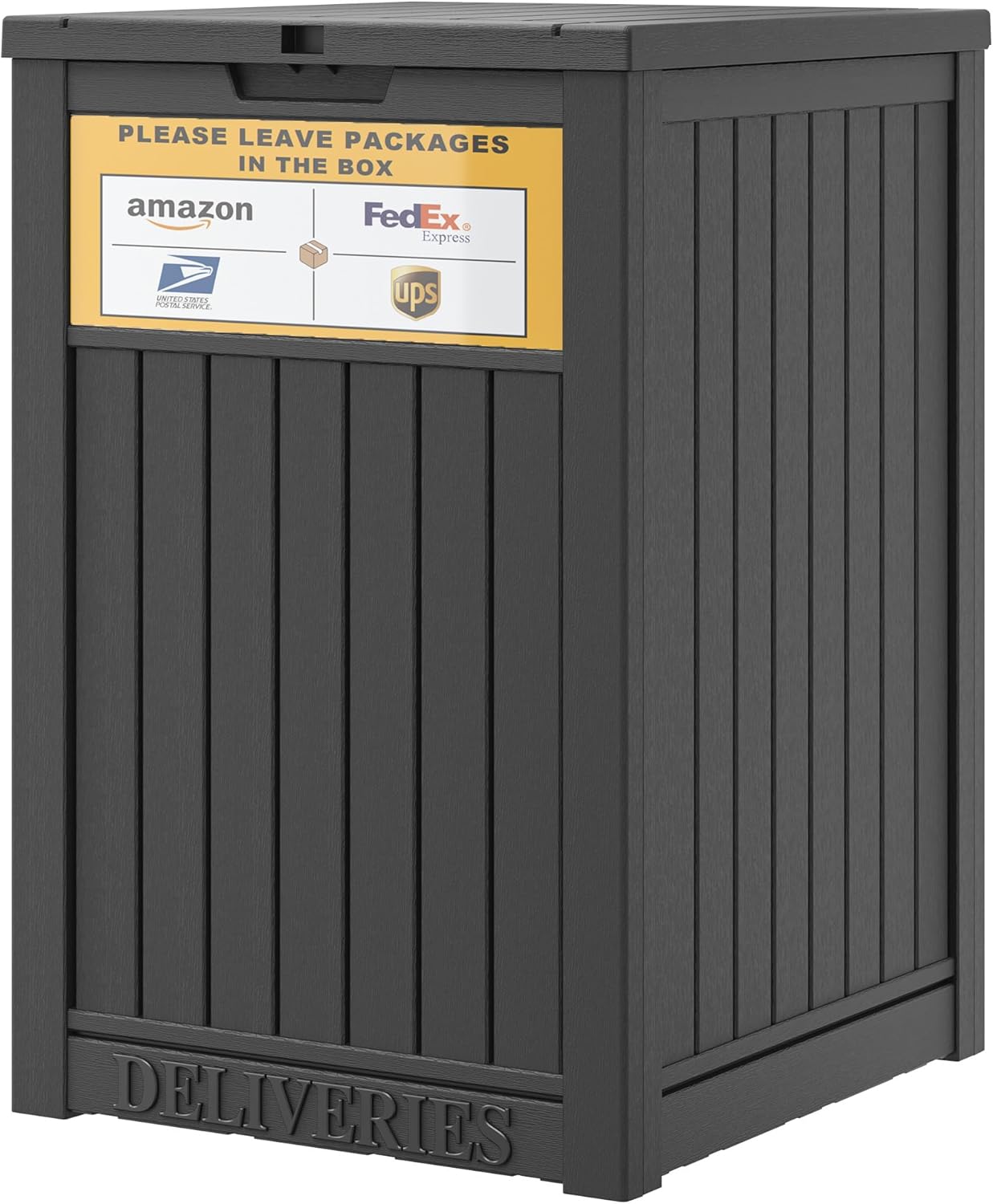
Secure Package Delivery Box
Weatherproof lockbox designed specifically for package deliveries. Protects Amazon orders from theft and weather damage. Holds multiple boxes simultaneously with combination lock security.

Smart Video Doorbell
Monitor Amazon deliveries in real-time with motion detection alerts. Two-way audio lets you communicate with delivery drivers. Cloud storage keeps delivery footage for verification and security.

Multi-Tier Package Organizer
Heavy-duty rack system keeps multiple Amazon deliveries organized on your porch. Weather-resistant construction protects packages from elements. Stackable design accommodates various box sizes efficiently.
Managing Returns & Refunds

Return Process Fundamentals
Amazon's return policy allows most items to be returned within 30 days of delivery. The return process starts in your order history where you select the specific item and reason for return. Amazon then generates a prepaid return label and provides instructions for your chosen return method.
Different return methods include UPS Store drop-off, Amazon Locker returns, Whole Foods returns, and Kohl's returns for select items. Each method offers unique advantages based on convenience and speed of refund processing.
Expert Return Strategies
Return Best Practices
- Initiate returns immediately upon deciding to send items back
- Use original packaging whenever possible for easier processing
- Take photos of items before packaging as documentation
- Choose carrier drop-off over mail pickup for faster refund processing
- Keep return confirmation emails until refund appears
- Check refund status after 2 business days from drop-off
Common Return Mistakes
- Waiting until the last days of the return window
- Losing return labels and trying to recreate them manually
- Forgetting to remove personal items from packages
- Not tracking return shipments back to Amazon
- Assuming refunds process instantly upon drop-off
- Discarding product packaging before testing items
Optimal Return Timing
Process returns within the first week of receiving items for maximum refund speed. Amazon prioritizes recently purchased items in their return queue. Early returns also ensure you stay well within the 30-day window, avoiding any deadline stress.
Drop off returns on weekday mornings when carriers process fewer packages. Your return shipment receives faster scanning and begins its journey to Amazon warehouses sooner. Weekend drop-offs often sit until Monday, delaying your refund by several days.
Prime Benefits & Perks

Core Prime Features
Amazon Prime membership transforms order management with exclusive benefits beyond free shipping. Prime members receive unlimited free Two-Day shipping on eligible items, saving substantial money on delivery fees. One-Day and Same-Day delivery options become available at no extra charge for millions of products.
Prime Early Access provides 30-minute early access to Lightning Deals, giving you first opportunity to purchase limited-quantity sale items. This benefit proves particularly valuable during major sales events when popular products sell out within minutes.
Maximizing Prime Value
- Use Subscribe & Save with Prime for additional 5-15% discounts on regular purchases
- Access Prime-exclusive deals that often beat standard sale prices by significant margins
- Leverage Prime Wardrobe to try clothing before purchasing
- Share Prime benefits with household members through Amazon Household feature
- Combine Prime shipping with Amazon Day to reduce packaging waste and delivery trips
Strategic Prime Usage
Calculate your annual shipping costs before renewing Prime membership. If you spend less than the membership fee on shipping yearly, consider ordering strategically to qualify for free standard shipping instead. Track your Prime savings through the membership dashboard to evaluate true value.
For families, share one Prime membership across two adults and up to four children through Amazon Household. This maximizes value by splitting the annual cost while giving everyone access to Prime shipping benefits and digital content services.
Order History & Account Management
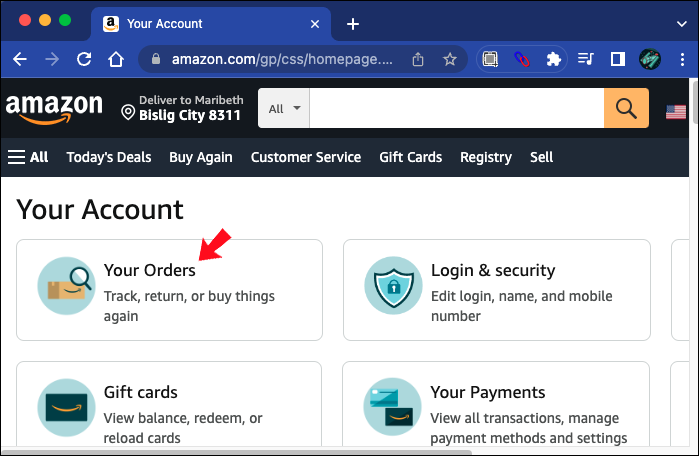
Essential Account Features
Your Amazon order history serves as a comprehensive purchase database spanning years of shopping. Access detailed records of every transaction including order dates, prices paid, delivery addresses, and payment methods used. This information proves invaluable for warranty claims, tax documentation, and reordering favorite products.
The "Buy Again" feature analyzes your order history to suggest repurchases of frequently bought items. This tool simplifies reordering household essentials, gifts, and consumable products without searching through thousands of Amazon listings again.
Account Management Best Practices
Order History Organization
Maintain clean order records for easier searching and reference.
- Archive old orders to declutter your active order list
- Use the search function to find specific past purchases quickly
- Download order reports for tax or budget tracking purposes
- Review digital order receipts instead of printing paper copies
Payment Method Management
Keep payment information current and secure for smooth order processing.
- Update expired credit cards before they cause order delays
- Set a default payment method for one-click ordering
- Use Amazon gift card balance for budget-controlled shopping
- Enable purchase notifications for fraud monitoring
Address Book Maintenance
Manage delivery addresses to prevent shipping errors.
- Set your primary address as default for automatic selection
- Remove old addresses to avoid accidental shipments
- Save gift recipient addresses with clear labels
- Update addresses immediately when moving
Communication Preferences
Configure how Amazon contacts you about orders and updates.
- Enable email notifications for all order status changes
- Opt into SMS alerts for delivery day updates
- Set app push notification preferences for real-time tracking
- Subscribe to product availability alerts for wishlisted items
Regular Account Maintenance Schedule
Review your Amazon account settings quarterly to ensure accuracy. Check payment methods in January, April, July, and October to catch expiring cards before they disrupt orders. Audit your address book twice yearly, removing outdated locations and confirming current addresses remain correct.
Download annual order reports each January for previous year tax documentation. These reports compile all purchase information into spreadsheet format, simplifying expense tracking for home office deductions or business purchases made through personal accounts.
Order Management Tech Essentials

Streamline your Amazon order management workflow with technology designed for frequent online shoppers. These tools help you track deliveries, organize receipts, and manage returns more efficiently.

Premium Tablet Stand
Adjustable stand perfect for monitoring Amazon orders and tracking deliveries hands-free. Sturdy aluminum construction holds tablets at optimal viewing angles. Ideal for kitchen counters or desk setups where you manage multiple orders simultaneously.

Wireless Label Printer
Bluetooth thermal printer eliminates need for ink when printing Amazon return labels. Connects directly to your smartphone or tablet for instant label printing. Compact design fits easily in home offices or shipping areas.

Digital Package Scale
Precise postal scale helps verify package weights before shipping Amazon returns. LCD display shows weights up to 55 pounds in multiple units. Battery-powered portability lets you weigh packages anywhere in your home.
Troubleshooting Common Issues

Frequent Order Problems
Package delivery issues rank among the most common Amazon order complications. Missing packages require immediate action through the "Where's My Stuff" feature in your order details. Amazon investigates delivery confirmations and carrier GPS data to locate packages or authorize replacements.
Wrong items received need reporting within 30 days for free return shipping and full refunds. Document errors with photos before initiating returns. Amazon usually provides instant refunds for clear shipping mistakes while arranging pickup of incorrect items.
Resolution Strategies
First, check all possible delivery locations including side doors, garages, mailrooms, and with neighbors. Review the delivery photo in your order details for clues about package placement. Wait 48 hours as some carriers mark packages delivered prematurely. If still missing, contact Amazon through "Where's My Stuff" to file a claim. Amazon typically approves refunds or replacements within 24 hours for confirmed delivery issues.
Take photos of both the damaged packaging and the product immediately. Go to your order details and select "Problem with order" then choose "Item defective or doesn't work." Upload your photos as evidence. Amazon reviews claims within hours and typically approves free return shipping with full refunds. For expensive items, Amazon may send a replacement before requiring return of the damaged product.
Check tracking information first to see the current package status. If tracking shows no movement for 3 days or passes the guaranteed delivery date, contact customer service for options. Amazon often provides partial refunds, shipping fee refunds, or free month of Prime for significantly delayed orders. You can also choose to cancel and reorder if you need the item urgently.
Payment failures usually stem from expired cards, insufficient funds, or billing address mismatches. Update your payment method in account settings with current information. Contact your bank if charges are being declined despite having available credit. Amazon holds orders for 3-5 days while you resolve payment issues before automatic cancellation occurs. Add a backup payment method to prevent future disruptions.
When to Contact Customer Service
Reach out to Amazon support immediately for time-sensitive issues like missing Prime delivery guarantees or urgent replacements. Use the phone option for complex problems requiring detailed explanation. Chat support works best for straightforward issues like return label reprinting or order modifications.
Prepare your order number, tracking information, and relevant photos before contacting support to expedite resolution. Customer service representatives have more authority to provide instant solutions when you present organized documentation of the problem.
International Orders & Shipping

Key International Features
Amazon Global Store enables purchasing from international Amazon marketplaces while managing orders through your home account. Import fees, customs duties, and international shipping costs display upfront during checkout, eliminating surprise charges upon delivery. Amazon handles customs clearance for most international shipments, simplifying the import process significantly.
AmazonGlobal shipping provides international delivery to over 100 countries with tracking throughout transit. Delivery times range from 5 to 14 business days depending on destination country and selected shipping speed. Some products ship internationally while others remain restricted to domestic markets due to regulations or manufacturer limitations.
International Order Best Practices
- Filter search results by "Ships to your country" to see only eligible products
- Review total costs including import fees before completing international purchases
- Understand that international returns may incur return shipping costs
- Allow extra time for customs processing during peak shopping seasons
- Provide accurate customs information to prevent delivery delays
- Check voltage and plug compatibility for electronics ordered internationally
Strategic International Shopping
Compare prices across different Amazon marketplaces before ordering. Sometimes purchasing from Amazon UK or Amazon Germany proves cheaper than Amazon US even with international shipping costs. Use currency conversion tools to accurately compare total costs including all fees and taxes.
Consolidate international orders when possible to save on per-item shipping fees. Many sellers offer combined shipping discounts when you purchase multiple items in one order rather than separate transactions. Plan international purchases in advance to take advantage of slower, cheaper shipping options instead of paying premium rates for express delivery.
Gift Orders & Special Occasions

Essential Gift Features
Amazon gift options transform regular orders into thoughtful presents with minimal effort. Gift wrapping services provide professional packaging for a small fee, arriving ready to give without additional preparation. Gift messages allow personalized notes to accompany shipments, adding a personal touch to remote gifting.
Gift receipts hide pricing information while maintaining return functionality for recipients. This feature lets gift recipients exchange items for different sizes or colors without seeing what you paid. Schedule delivery dates ensure gifts arrive on specific occasions rather than immediately upon ordering.
Pro Gift Ordering Strategies
Gift Registry Benefits
Leverage Amazon's registry features for foolproof gift giving.
- Find registries by recipient name or email address
- View purchased items to avoid duplicate gifts
- Ship gifts directly to registry addresses automatically
- Include gift messages specific to each registry item
Group Gifting Solutions
Coordinate with others when giving expensive gifts collectively.
- Share wish lists among family members for coordination
- Use Amazon gift cards when uncertain about preferences
- Mark items as purchased on shared lists immediately
- Combine budgets through gift card pooling strategies
Last-Minute Gift Options
Handle forgotten occasions with Amazon's fast gift solutions.
- Purchase digital gift cards for instant email delivery
- Filter by Same-Day or One-Day delivery for physical gifts
- Choose gift-eligible Prime items for fastest processing
- Use printable gift cards as temporary placeholders
Surprise Delivery Tactics
Maintain secrecy when sending surprise gifts remotely.
- Ship to recipient's workplace for guaranteed surprise
- Mark orders as gifts to hide from purchase history
- Use Amazon Locker for recipient pickup surprises
- Coordinate delivery dates around recipient schedules
Optimal Gift Timing
Order gifts two weeks before needed delivery dates to account for potential delays. Major holidays create shipping congestion that extends delivery times beyond normal estimates. Prime shipping remains the most reliable option during peak gifting seasons when carrier capacity becomes strained.
Schedule gift deliveries for weekdays rather than weekends when recipients are more likely to be home. Weekday deliveries reduce the risk of package theft and ensure timely receipt for time-sensitive occasions like birthdays or anniversaries.

Premium Organization Tools for Power Shoppers

Frequent Amazon shoppers benefit from premium organization solutions that streamline order management, receipt storage, and package processing. These professional-grade tools transform chaotic delivery schedules into organized systems.

Executive Desk Organizer
Multi-compartment organizer designed for managing order receipts, return labels, and shipping supplies. Premium wood construction with leather details. Perfect for home offices where you process frequent Amazon orders and returns.

Multi-Device Charging Hub
Six-port charging station keeps all your order-tracking devices powered simultaneously. Wireless charging pad for compatible phones. Smart charging technology prevents overcharging while maintaining readiness for package alerts and delivery notifications.

Compact Filing System
Professional filing cabinet sized for home offices managing extensive order documentation. Lockable drawers protect sensitive purchase records and warranty information. Organize receipts by month, category, or tax year for easy retrieval.
Mastering Your Amazon Order Experience

Effective Amazon order management combines understanding platform features with strategic planning and the right tools. From tracking packages in real-time to processing returns efficiently, mastering these skills saves time and reduces shopping stress significantly.
The techniques covered in this Amazon orders guide apply whether you're a casual shopper or power user processing dozens of orders monthly. Start implementing one or two strategies immediately, then gradually incorporate additional tips as you become comfortable with enhanced order management processes.
Remember that Amazon continually updates features and policies. Check your account settings quarterly to discover new tools and optimize existing preferences. With proper management techniques and helpful tools, your Amazon shopping experience becomes smoother, more efficient, and considerably more enjoyable.